
AI Pet Dance Generator
Turn dog and cat photos into funny dance videos with pet-friendly templates. If your image is cropped, messy, or not motion-ready, fix it first with Dance Image Editor and then generate your pet dance clip.
Turn dog and cat photos into funny dance videos with pet-friendly templates. If your image is cropped, messy, or not motion-ready, fix it first with Dance Image Editor and then generate your pet dance clip.
Turn dog and cat photos into funny dance videos with pet-friendly templates. If your image is cropped, messy, or not motion-ready, fix it first with Dance Image Editor and then generate your pet dance clip.
Start with a clear dog, cat, or other pet photo and let the generator handle the dance motion.
Pick a motion style that fits your pet and keep the workflow simple from start to finish.
Export a short pet dance video for TikTok, Reels, Shorts, or private sharing.
Credits
20
Generate Pet Dance Video
How It Works
@aibabydance
Output
Short pet dance clip
Format
Template-based motion
Pets
Dogs, cats, more
Templates
Easy to choose
Stable motion
Cleaner results
Share-ready
Made for social
Private
Your photos stay protected
Credits are consumed when generation starts. Failed generations are refunded.
Your photos are processed securely and never stored.
Upload a pet photo, choose a dance template, and turn it into a funny pet dance video. Great for dog dance videos, cat dance clips, and quick social posts.
Pet photo + dance template + motion control
Model
Kling 2.6 Motion Control
Pet Photo
Upload pet photo
JPG, PNG, WebP (max 10MB)
Or try an example
Dance Template
View All
Upload
0:15
0:06
0:22
0:08
0:18
0:20
Resolution
720p
1080p
Character Orientation
Video
Image
Pet Templates
Preview Mode
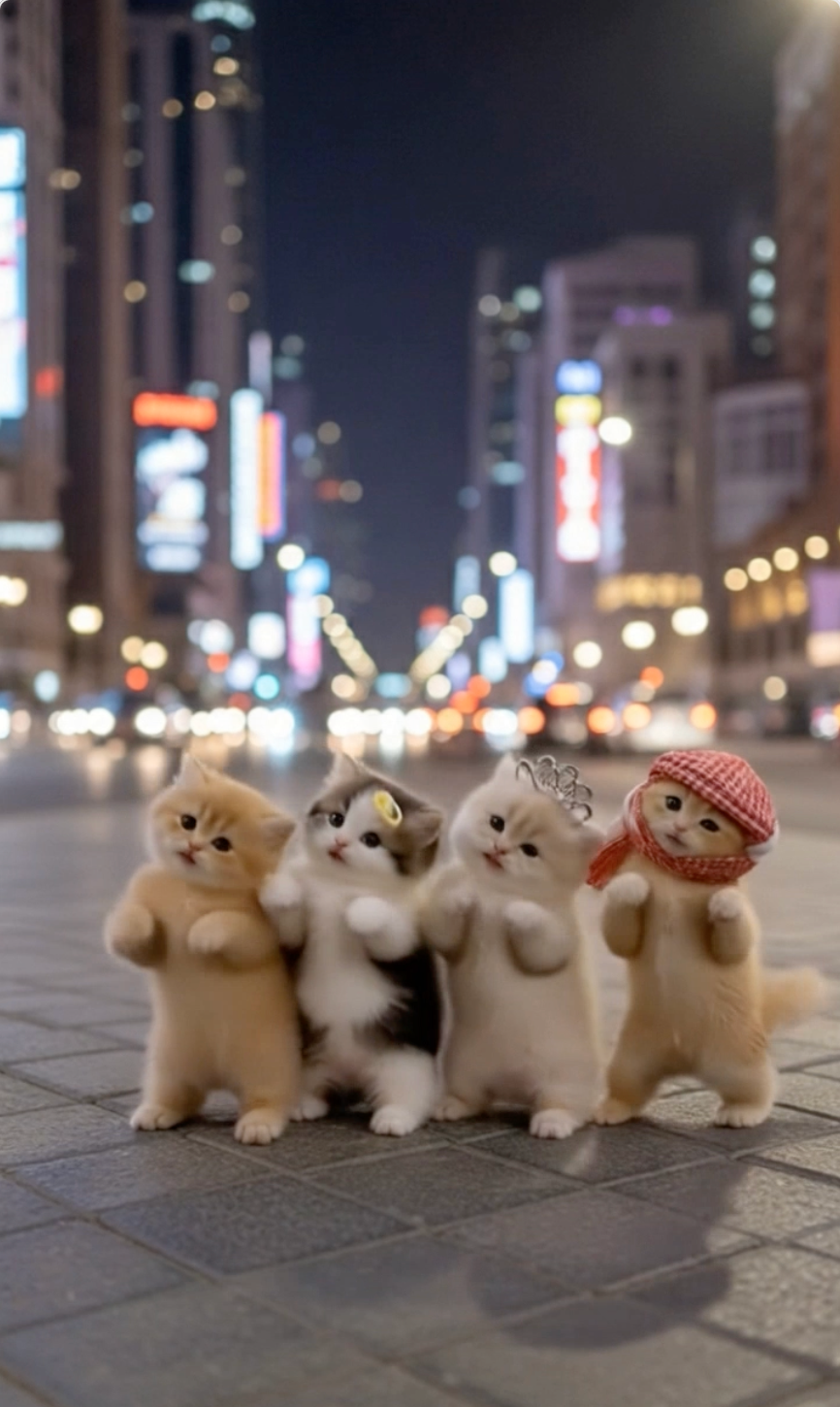
Upload one clear pet photo and let the generator animate it into a short dance video. The process stays fast and simple for first-time users.
Pet-friendly templates make it easier to get motion that feels natural rather than overly chaotic. That usually leads to a better first result.
A clean photo and a matching dance template help the model keep the subject readable through the clip. That means fewer messy outputs and more usable results.
Turn pet photos into clips you can post on TikTok, Reels, Shorts, or send to friends. The workflow is built for quick, shareable results.
A good template helps pet photos turn into cleaner, more shareable clips. This section shows how the generator keeps the workflow simple while improving the result.
Start Generating
Explore Templates
Create a Video
Try It Now
An AI pet dance generator takes a photo of a dog, cat, or other pet and maps it to a predefined dance motion. You upload the image, choose a template, and let the model animate the subject while keeping the workflow simple.
The best input is usually a clear photo with the pet fully visible. Good lighting, a readable pose, and minimal background clutter help the model understand the subject better and produce cleaner motion.
Templates make the workflow practical for social sharing. Instead of describing motion with a long prompt, you start from a known dance pattern with clear rhythm and pacing.
If your goal is a funny but believable pet dance video, focus on three variables first: photo quality, motion fit, and clip length. A strong reference photo, a template that matches the subject, and a short duration usually work best.
Use the AI Pet Dance Generator whenever your subject is a dog, cat, or other animal. The model handles animal anatomy and quadruped movement better when paired with pet-friendly templates.
The most common cause of a bad pet dance video is a poor input image. If your pet's body is cropped, paws or tail are cut off, the subject is turned away, or the background is incredibly messy, the animation will likely struggle.
These practical tips explain how pet photo to video generation works, which dog and cat photos perform best, and how to get a cleaner first result.
For users searching terms like pet dance video, animate a pet photo, or AI pet animation, the main value is speed. The tool turns one image into a short, shareable clip without editing software or manual animation.
If the pet is cropped too tightly, turned away, or hidden by objects, the clip can look less stable. A simple, high-resolution reference photo usually gives the best starting point. If the photo needs cleanup first, use Dance Image Editor before you animate it.
This is especially useful when you want a dog dance video or cat dance video that feels predictable. The template gives you a repeatable style, so it is easier to match the subject and regenerate if needed.
For most users, the best workflow is simple: upload a clear pet photo, choose a template with readable motion, generate a short preview, then iterate one variable at a time. That keeps results consistent and makes sharing easier.
If your photo features a human adult, creator, or general portrait, switch to the main AI Dance Video Generator instead. Keeping these workflows separate ensures you get the best motion quality for your specific subject type.
In these cases, do not generate the video immediately. Instead, run the photo through the Dance Image Editor first to uncrop, expand the frame, and clean up distractions. A clean, full-body input photo dramatically improves the final video output.
Use a clear photo with one visible pet. Good lighting and a simple background usually improve the final result.
Browse the available motion styles and select the template that best matches the energy and framing of your pet photo.
Create the video, preview the result, and download a clip ready for TikTok, Reels, Shorts, or private sharing.
Create a pet dance video in three simple steps. The generator handles the motion while you control the photo and template.
Photos that show the whole subject usually work better than tightly cropped images.
If paws, tail, or the body are cut off, prepare the image in Dance Image Editor before you generate the video.
Soft, even lighting helps the model keep the pet readable and reduces messy motion.
Short clips are easier to preview, tweak, and share on social platforms.
A calm photo usually works better with a simpler motion, while a lively pose can handle more energy.
Use these simple tips to get cleaner, more shareable pet dance videos from your first attempt.
Turn a favorite dog photo into a funny birthday clip that feels personal and shareable.
Create playful cat dance clips that work well for meme accounts and quick social posts.
Make a short dance video as a gift for a friend, family member, or fellow pet owner.
Generate fast, funny clips for TikTok, Instagram Reels, or YouTube Shorts.
Use the generator for social posts, memes, gifts, and everyday fun.
Try This Idea
Common questions about turning pet photos into dancing videos.
How does the AI pet dance generator work?
Can I try the AI pet dance generator for free?
What kind of photo works best?
Can I make dog dance videos and cat dance videos?
Can I post the result on TikTok, Reels, or Shorts?
What is the difference between AI Pet Dance and AI Dance Video Generator?
When should I use Dance Image Editor before generating a pet dance video?
Does AI Pet Dance work better for dogs and cats than a general dance generator?
Upload a pet photo, choose a dance template, and generate a shareable clip in minutes. Need a cleaner photo first? Open Dance Image Editor before you animate it.
Create Pet Dance Video
Open Dance Image Editor